Multi-variation matrix
Some ShopWired retailers sell products where customers need to order multiple variation combinations at once. This is common for products that come in several sizes or measurements, such as clothing, workwear, schoolwear, promotional items, and other products where a customer may want to buy several sizes of the same colour in a single order.
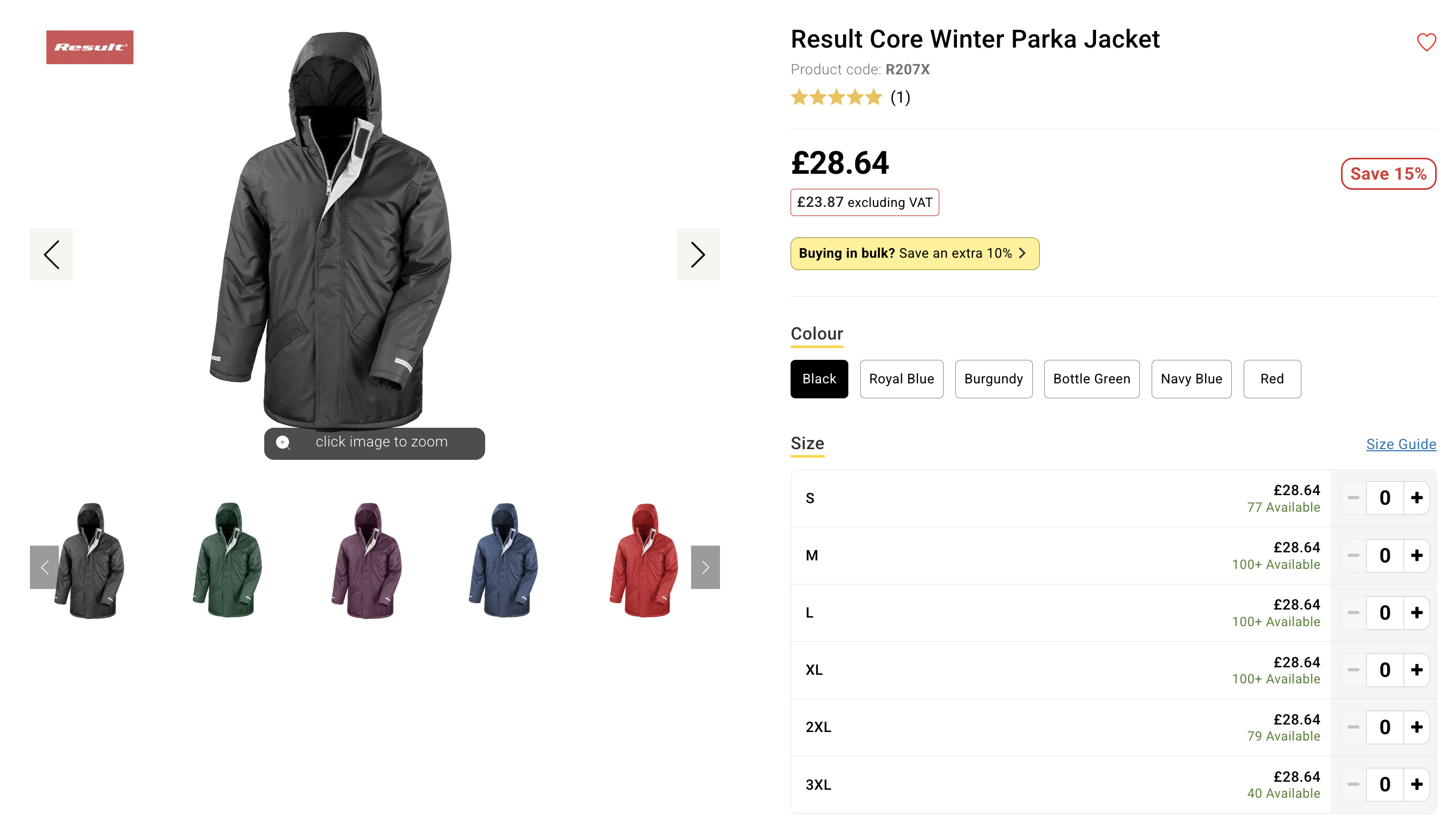
To support this, ShopWired themes can display variations in a quantity matrix instead of the standard single-variation selector. This replaces the normal add to basket flow with a table where customers can enter quantities for multiple variations and add them all to the basket at the same time.
This feature is part of ShopWired’s variation system. It does not require product choices, product extras, customisation fields or file uploads but they can also be included with the feature.
How the feature works
The quantity matrix appears when a product has two or more variation options, most commonly something like:
- Colour → Size
- Style → Colour → Size
- Style → Size
- Length → Width
The page presents variation selection in two stages:
- The first option (e.g. Colour) can be shown either as buttons or a traditional dropdown
- The second option (if present) can be shown either as buttons or a traditional dropdown
- Once a value is selected for the first and second options, the third option (e.g. Size) is displayed as a list of rows, each containing: -- The variation name (e.g. S, M, L) -- The variation price -- The available stock -- A quantity selector
The visitor can enter quantities for as many variations as they want. When they select add to basket, all chosen variations are added to the basket together in one action.
This allows quick ordering of multiple variations without repeatedly changing the selected variation and adding each one individually.
What the customer sees
When using the matrix layout, customers can:
- Choose a colour (or the first variation option) using buttons
- View all sizes (or second variation options) at once
- See prices and stock levels immediately for each variation
- Enter quantities for multiple variations
- Add all selected variations to the basket in a single click
This is significantly faster than adding each variation one at a time, and is especially useful for trade, uniform, and bulk buyers.
Pricing and stock behaviour
The matrix displays each variation’s own data:
- Price or sale price
- Stock quantity / stock status
- SKU (can be shown to the visitor)
- Other variation-specific attributes (weight, GTIN, VAT rate, etc.) can also be displayed
If a variation does not have its own price or attributes configured, it inherits values from the parent product, consistent with standard ShopWired variation behaviour.
Stock tracking works normally. When the customer adds multiple variations at once, the platform adjusts stock levels for each variation included in the order.
Implementing the matrix
The quantity matrix is not installed in ShopWired themes by default and instead needs to be added by making changes to your theme's code.
Contact theme support for assistance.

